AI Inbox Automation: How to Sort, Understand and Route Sales Enquiries
Kort sammanfattat
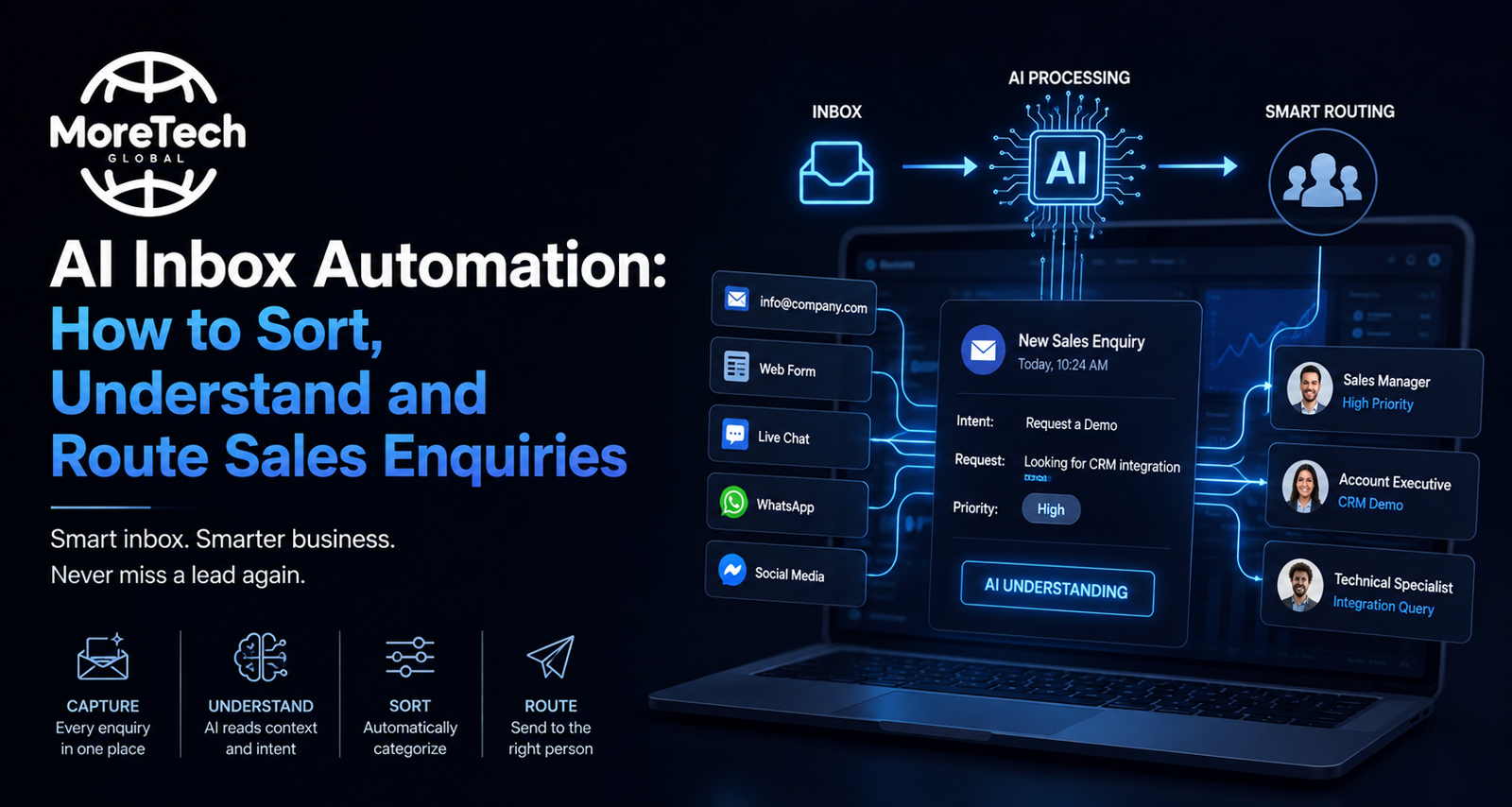
AI inbox automation uses natural‑language models to classify, route, and schedule sales enquiries, turning every call‑in into a booked job for Swedish VVS contractors by reducing response time and increasing conversion rates.
TL;DR
- AI inbox automation classifies, routes, and schedules sales enquiries, boosting conversion and cutting response time for Swedish VVS contractors.
AI Inbox Automation: Turning Every Call‑In into a Booked Job
For a Swedish VVS contractor with three to thirty staff, the first email or phone call that arrives is often the most valuable lead in the month. Yet many firms lose up to 30 % of potential revenue because their inboxes are still managed manually. AI inbox automation—where natural‑language models read, classify, and route every message—offers a concrete decision framework: identify the right tool, map the workflow, test, iterate, and scale.
1 . Map Your Current Lead Flow
Before you buy an AI agent, chart how each enquiry moves from inbox to job booking. Use a simple swim‑lane diagram: Inbox → Triage → Sales Rep → Follow‑up → Confirmation. Ask:
- How many emails arrive per day?
- What percentage are unanswered after 24 h?
- Which staff member handles the most enquiries?
Document the average time from receipt to first reply. In a typical small VVS firm, this can be 3–5 hours—time that could otherwise be spent on field work.
2 . Choose the Right AI Inbox Tool
Three categories dominate the market in 2026:
- Classification & Routing – AI reads subject and body, tags as inquiry, quote request, support, invoice, then forwards to the correct team member. Zenphi’s inbox automation is a leading example (source: Zenphi Inbox Automation). It also extracts key fields like customer name and job location.
- Smart Summaries & Drafts – For long threads, the AI generates a concise summary and proposes a reply. Google Workspace Agents use Gemini 3 to do this automatically (source: Google Workspace Agents Tutorial).
- End‑to‑End Scheduling & Follow‑up – Some agents can book appointments and send reminders, reducing the need for manual calendar entries. Agentic.ai’s platform claims to handle 30 % of customer interactions today (source: Agentic AI Inbox Automation).
Select a tool that covers at least classification and scheduling; the other features can be added later.
3 . Build Your First Workflow
Rule‑based vs. ML‑driven routing: start simple, then evolve.
Step 1: Create a rule set. For example:
- If sender domain is
@customer.se, route to Sales Rep A. - If subject contains “pris” (price), tag as Quote Request and auto‑reply with a price sheet link.
Step 2: Train the AI classifier. Upload a sample of past emails (50–100) labeled by type. The model will learn to predict categories for new messages.
Step 3: Set up auto‑responses. For each category, draft a concise reply that acknowledges receipt and promises a follow‑up within X hours. Use the AI’s drafting feature to keep tone consistent.
4 . Test with a Pilot Group
Select one sales rep or a single day of traffic to run the automation. Measure:
- Time from receipt to first reply (target < 1 hour).
- Number of enquiries that progressed to a quote.
- Feedback from the rep on missed nuances.
If the pilot shows a 40 % reduction in response time and a 15 % increase in quoted jobs, roll out company‑wide. If not, revisit the rule set or retrain the classifier with more examples.
5 . Integrate with Your Existing CRM
Many small VVS firms use simple spreadsheets or basic CRMs. AI inbox tools can push data directly into these systems:
- Zapier or Integromat connectors allow email fields to populate customer records.
- For Google Workspace users, Jeeva AI offers a pre‑built integration that syncs with Google Sheets.
Ensure the CRM can handle the new data fields (e.g., Job Type, Estimated Cost, Contact Timezone) so that follow‑ups remain personalized.
6 . Monitor, Iterate, and Scale
Set up a dashboard that tracks:
- Email volume vs. response rate.
- Conversion from enquiry to booked job.
- Average cost per interaction (AI agents typically cost $0.50–$0.70 per conversation versus $6–$8 for human staff).
Use these metrics quarterly to decide whether to add more AI features—such as sentiment analysis to flag urgent complaints—or to expand the system to other communication channels like SMS or WhatsApp.
7 . Avoid Common Pitfalls
- Over‑automation of complex queries: Some enquiries require human judgment (e.g., emergency repairs). Set a threshold where emails flagged as “high urgency” bypass AI and go straight to the on‑call technician.
- Ignoring data privacy: Swedish GDPR mandates that personal data be handled securely. Verify that your chosen tool stores data in EU servers or offers encryption at rest.
- Failing to train staff: Even the best AI will underperform if users don’t know how to override or correct it. Allocate 2 hours of onboarding per rep.
Sources
- GDPR and ethical review glossary | SciLifeLab Research Data Management Guidelines
- Why Most Contractors Dont Know Their True Profitability
- Agentic AI in Customer Experience and Interaction
- AI vs Human Agents: Cost Comparison - Converso
- Average Response Time: Definition, Benchmarks, and Best Practices
- 20 Inbox Automation Trends 2026: this+that
Related reading
Vanliga frågor
What is AI inbox automation?
AI inbox automation uses natural‑language models to read, classify, and route every message, automatically generating summaries, drafts, and scheduling follow‑ups to streamline sales enquiries.
Which AI tools are best for VVS contractors?
In 2026, top tools include Zenphi for classification & routing, Google Workspace Agents for smart summaries & drafts, and Agentic.ai for end‑to‑end scheduling & follow‑up.
How do I start implementing AI inbox automation?
Begin by mapping your current lead flow, choose a tool covering classification and scheduling, build rule‑based workflows, pilot with a small group, integrate with your CRM, then monitor and iterate.
What are common pitfalls to avoid?
Avoid over‑automation of complex queries, ensure GDPR compliance, and train staff to override or correct AI decisions.
How much does AI inbox automation cost?
Typical AI agents cost $0.50–$0.70 per conversation versus $6–$8 for human staff, offering significant cost savings.